8K8 Deposit – Complete Fast Cash-In Guide for Players
8K8 Deposit processes user transactions within seconds, enabling online casino enthusiasts in the Philippines to instantly top up their balance and access premium gaming titles. The platform supports local e-wallets, online bank transfers, digital wallets, and crypto networks with zero handling fees across major methods. This comprehensive article covers available funding channels, exact transaction steps, quick error-fixing strategies, and essential account security recommendations 8K8.
Technical Specifications of Funding Methods
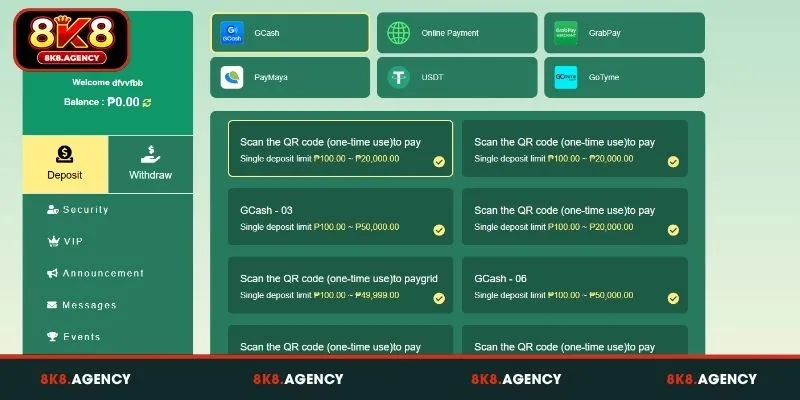
Comparing transaction parameters across available payment options ensures you pick the best channel for speed and convenience. The following table details limits and recommended amounts for each supported gateway:
| Payment Method | Channel Options | Single Deposit Limit (PHP) | Recommended Preset Amounts | Handling Fee |
| GCash | QR Scan, GCash-03, GCash-06 | ₱100.00 – ₱50,000.00 | ₱100 / ₱200 / ₱500 / ₱1,000 / ₱3,000 | ₱0 |
| Online Payment | Unionbank, GoTyme Bank | ₱1,000.00 – ₱50,000.00 | ₱1,000 / ₱3,000 / ₱5,000 / ₱10,000 | ₱0 |
| GrabPay | GrabPay-01 | ₱100.00 – ₱50,000.00 | ₱100 / ₱300 / ₱500 / ₱800 / ₱1,000 / ₱5,000 | ₱0 |
| PayMaya | PayMaya-01, PayMaya-02, PayMaya-03 | ₱100.00 – ₱50,000.00 | ₱100 / ₱200 / ₱500 / ₱1,000 / ₱3,000 / ₱5,000 | ₱0 |
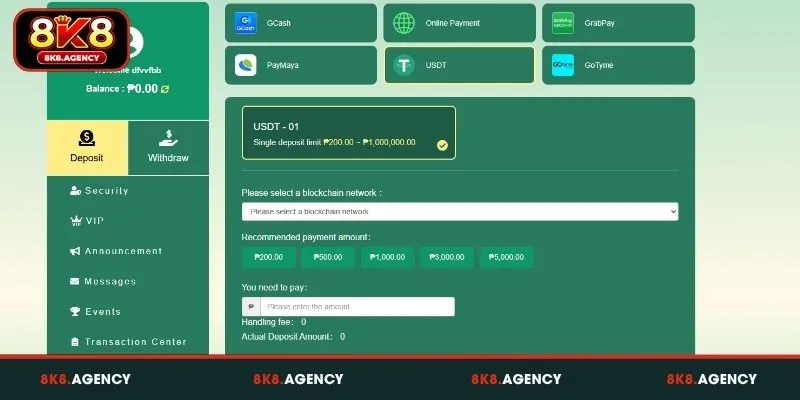
| USDT | USDT-01 (Blockchain) | ₱200.00 – ₱1,000,000.00 | ₱200 / ₱500 / ₱1,000 / ₱3,000 / ₱5,000 | ₱0 |
| GoTyme | GoTyme-02, QR Scan | ₱100.00 – ₱50,000.00 | ₱100 / ₱200 / ₱500 / ₱1,000 / ₱3,000 / ₱5,000 | ₱0 |
These options provide full zero-fee coverage so 100% of your transferred PHP goes directly into your playable account balance.
Step-by-Step 8K8 Deposit Execution Guide
Completing your top-up request takes less than 2 minutes when following the standardized online checkout system. Execute these quick steps to fund your account immediately:
- Log In to Your Member Profile: Access your account using your verified username and password.
- Navigate to Cashier: Tap on the “Deposit” or “Recharge” icon located in your account dashboard.
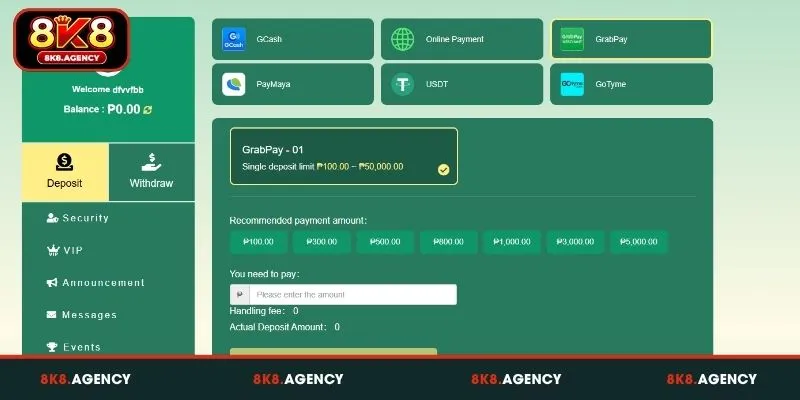
- Select Payment Gateway: Choose your preferred payment icon from GCash, Online Payment, GrabPay, PayMaya, USDT, or GoTyme.
- Choose Specific Channel: Pick an active sub-channel option (e.g., GCash-03 or PayMaya-01) based on your target transaction amount.
- Set Payment Amount: Click one of the quick preset buttons (e.g., ₱100, ₱500, ₱1,000) or enter a custom value in the “You need to pay” field.
- Confirm and Pay: Click the green “Pay Immediately” button to launch the secure payment portal or generate a one-time QR code.
- Complete Authorization: Open your e-wallet or banking app, scan the generated one-time QR code or authorize the transfer, and save your receipt screenshot.
Once authorized, the system updates your actual wallet balance automatically, letting you jump straight into real-money games.
Learn more: 8K8 Withdrawal – Detailed Step-by-Step Fund Cash-Out Guide
Common Errors and Solutions During 8K8 Deposit
While automated payment pipelines process most requests seamlessly, temporary bank maintenance or incorrect inputs can stall transactions. Below are quick troubleshooting actions for common top-up obstacles:
Bank System Under Maintenance Notice
When attempting to initiate a deposit, selecting a specific banking institution displays a system pop-up alert stating that the bank is undergoing scheduled or emergency system maintenance (for example, a BDO or BPI maintenance alert). Proceeding with a transfer while the issuing bank or payment gateway is offline will result in pending status, unrecorded transfers, or delayed balance updates.
The most effective resolution is to switch immediately to an alternative available banking channel. If your primary bank is unavailable, select secondary choices such as Unionbank or GoTyme Bank. Alternatively, instant e-wallets like GCash or PayMaya offer robust fallback options with minimal processing friction. If you must use a specific bank undergoing maintenance, hold off on sending funds until the maintenance notice is formally cleared by the platform to avoid manual verification queues.
Reusing One-Time QR Codes
A frequent cause of failed or delayed top-ups occurs when users attempt to scan and pay using a previously saved or bookmarked QR code. Modern online gaming and payment platforms generate unique, single-use dynamic QR codes bound to a specific transaction session, timestamp, and account reference. Scanning an old QR code causes the system’s automated payment gateway to fail to match the incoming payment to an active request.
Always generate a fresh one-time QR code for every single deposit request you make. Never re-scan screenshots stored in your mobile gallery from previous days or hours. Reusing old QR codes violates security protocols, breaks automated reconciliation algorithms, and requires customer support intervention to manually locate and credit your funds—a process that can take up to several business days.
Amount Outside Single Transaction Limits
Entering an amount that falls below the minimum required floor or exceeds the maximum single-transaction ceiling will trigger a validation error. When this happens, the cashier system prevents you from submitting the request or grays out the proceed button.
Always double-check the specific minimum and maximum deposit thresholds assigned to your chosen payment method before entering the desired amount. For instance, standard e-wallets like GCash or PayMaya typically handle transactions ranging from ₱100 to ₱50,000, whereas cryptocurrency channels like USDT cater to higher volumes, ranging from ₱200 up to ₱1,000,000 equivalent per order.
If you wish to deposit an amount larger than the maximum limit for your selected channel, simply split the total sum into multiple smaller transfers or opt for a higher-capacity option like crypto or bank transfer.
Essential Safety Protocols for Cashier Transactions
Keeping your online wallet protected during financial transfers requires consistent safety habits across all connected payment apps.
- Verify Official QR Codes: Only scan QR codes directly generated inside your personal deposit session.
- Keep Payment Receipts: Always screenshot your e-wallet reference number or bank confirmation slip until the balance reflects in your account.
- Avoid Third-Party Accounts: Cash in using e-wallet or bank profiles that strictly match your registered platform account full name.
Conclusion
8K8 Deposit offers members in the Philippines a fast, versatile, and secure financial portal supporting popular e-wallets and online banking networks with zero handling fees. By selecting your preferred channel, adhering to single transaction limits, and scanning fresh single-use QR codes, you can instantly top up your playable balance without friction. Experience quick transactions today and enjoy top casino entertainment on 8K8 responsibly!