8K8 Withdrawal – Detailed Step-by-Step Fund Cash-Out Guide
8K8 Withdrawal enables members in the Philippines to seamlessly transfer their gaming payouts directly into verified e-wallets or personal bank accounts. By offering multiple payment gateways like GCash, PayMaya, GrabPay, Gotyme, and local Bank Cards, players enjoy maximum flexibility when managing their earnings. This comprehensive walkthrough covers supported payout options, exact step-by-step setup procedures, fast error-resolution techniques, and crucial security tips for reliable transfers 8K8.
Technical Specifications of Cash-Out Gateways
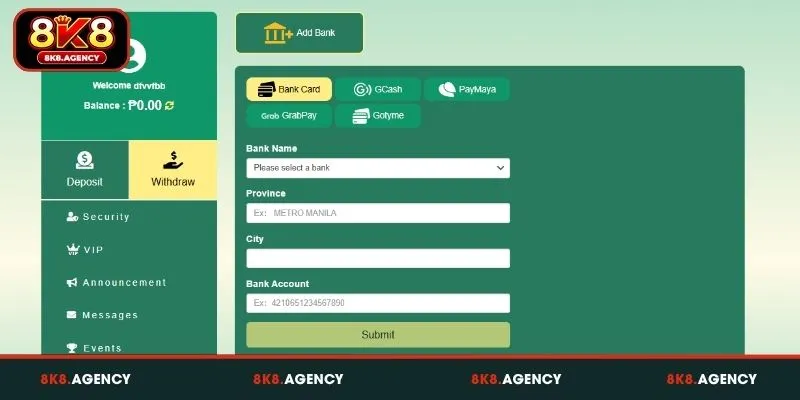
Before submitting cash-out requests, reviewing the operational data formats across payment options ensures full accuracy. The table below outlines the specific form parameters required for each supported method:
| Method Name | Key Form Inputs Required | Processing Window | Default Country Prefix |
| Bank Card | Bank Name, Province, City, Bank Account Number | 15–30 Minutes | Local Branch Routing |
| GCash | Full Name, Registered Mobile Number | 3–10 Minutes | +63 (e.g., 09123456789) |
| PayMaya | Full Name, Registered Mobile Number | 3–10 Minutes | +63 (e.g., 09123456789) |
| GrabPay | Full Name, Registered Mobile Number | 5–15 Minutes | +63 (e.g., 09123456789) |
| Gotyme | Account Number | 5–15 Minutes | Direct Account Linking |
Configuring these details accurately guarantees that cash-out requests are automatically matched and transferred without manual clearing delays.
Step-by-Step 8K8 Withdrawal Execution Procedure
Linking your bank or e-wallet account takes under 2 minutes through the centralized member dashboard. Follow these straightforward steps to complete account binding and process your cash-out smoothly:
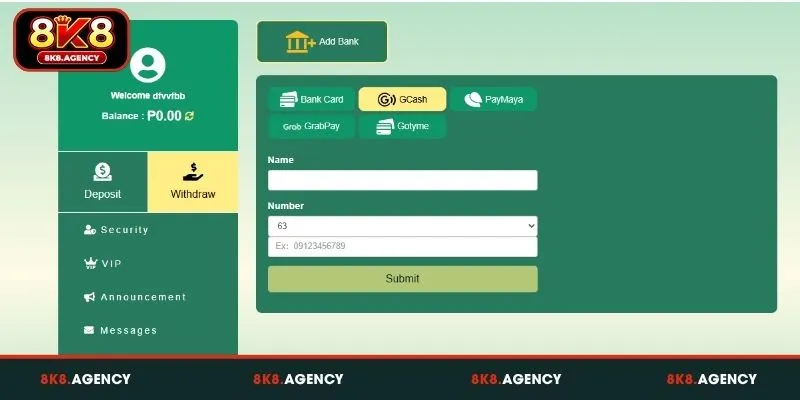
- Access Account Dashboard: Log into your profile and click on the yellow “Withdraw” tab located on the side menu.
- Open Account Binding Form: Click the “Add Bank” button at the top of the interface to initiate gateway setup.
- Select Gateway Type: Choose your preferred payout method among Bank Card, GCash, PayMaya, GrabPay, or Gotyme.
- Input Financial Details:
- For Bank Card: Choose your bank from the dropdown, fill in Province, City, and Bank Account number.
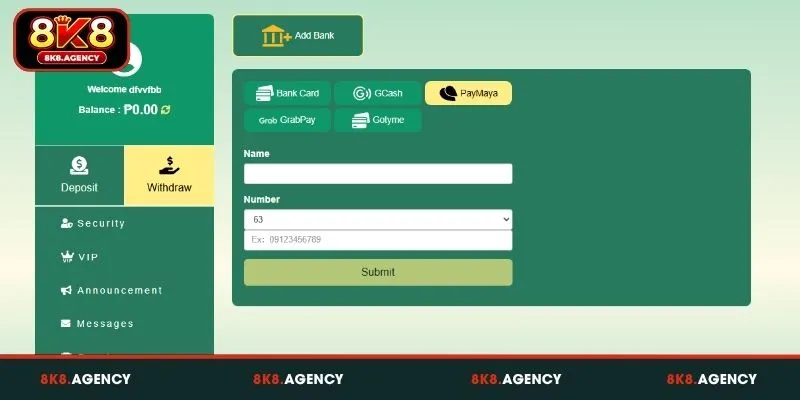
- For GCash / PayMaya / GrabPay: Type your full Name and your 10-digit mobile Number.
- For Gotyme: Input your official Gotyme Account Number into the field.
- Submit Data: Review all entries carefully and click the green “Submit” button to save your payment profile.
- Request Payout: Enter your desired cash-out amount in PHP, input your transaction password, and press confirm to process your transfer.
Once submitted, automated financial channels process requests within minutes, delivering funds directly into your chosen e-wallet or bank balance.
See more: 8K8 Slots – Spin the Reels and Claim Massive Jackpot Rewards
Troubleshooting Common 8K8 Withdrawal Issues
While automated payout networks process most requests seamlessly, minor input errors or unmet wagering conditions can pause transfers. Here are practical fixes for frequent obstacles encountered during cash-outs:
Name Mismatch Error
Your cash-out request fails immediately, remains stuck in pending status, or generates a rejection notification from customer support during processing. Modern online entertainment platforms implement strict Anti-Money Laundering (AML) and security protocols that prohibit third-party transactions.
The payment system requires your bound e-wallet (such as GCash or PayMaya) or bank account name to match your registered full name on 8K8 character for character. When binding a payment channel under the “Add Bank” section, double-check that middle initials, capitalization, and spelling are identical to your official ID and payment profile.
If you made a typographical error during account registration, submit an urgent verification request to Customer Support with a valid government ID to update your profile details before attempting another withdrawal.
Unmet Wagering Requirements
Your wallet dashboard displays an account balance, but when you attempt to request a payout, the transaction is rejected or the cash-out button remains greyed out and locked.
Review your account activity for active deposit bonuses, welcome offers, or promotional rewards. Most promotional events come with specific turnover or wagering multiples (e.g., 10x or 15x turnover) before bonus funds and associated winnings can be converted into withdrawable cash.
Navigate to the platform’s promotion center or member center to monitor your real-time turnover progress. Complete the remaining required valid bets across eligible game categories (such as slots, fishing games, or live casino tables) to fully unlock your funds for withdrawal.
Incorrect Mobile Number Format
When attempting to link a GCash or PayMaya account, the cashier interface continuously reports an “Invalid Phone Number” or “Format Error” alert, preventing you from saving your payout channel.
The input field frequently auto-applies the official Philippine country code (+63) by default. When entering your mobile phone number, omit the leading zero (0). Enter the remaining 10-digit number starting with the digit 9 (for example, type 9123456789 instead of 09123456789). Adding an extra zero creates an 11-digit string following the country prefix, which triggers an invalid length validation error.
Account Defense and Security Rules
Protecting your balance and securing seamless withdrawals requires strict compliance with platform safety protocols. Establishing robust financial security habits when configuring payment channels ensures that your winnings remain safe from unauthorized access and transaction stalls. Below are the foundational security rules every user must follow:
- Keep Credentials Confidential: Never share your account login passwords, one-time passwords (OTPs), or transaction PINs with anyone. Official platform staff members, customer service representatives, and payment administrators will never ask for your password or private security keys. Treat your credentials as strictly private to prevent account compromise.
- Double-Check Account Numbers: Always verify every digit of your bank account card, GCash mobile number, or crypto wallet address before pressing the final “Submit” button. Input errors can redirect funds to incorrect accounts or stall automated processing systems, requiring lengthy manual verification procedures to trace.
- Bind Only Personal Accounts: Only attach e-wallets, bank cards, or crypto accounts that belong directly to you. Adding third-party payment accounts violates Anti-Money Laundering (AML) standards. The system’s automated security algorithms instantly detect mismatched ownership details, which will flag your account, freeze pending payouts, and trigger mandatory identity verification holds.
Conclusion
8K8 Withdrawal offers members across the Philippines a dependable, convenient, and fast system to collect earnings via local bank cards and popular e-wallets like GCash, PayMaya, GrabPay, and Gotyme. By following accurate field formatting rules, matching registered names, and keeping transaction PINs secure, players can enjoy quick access to their PHP balance anytime. Complete your account setup today and manage your online casino rewards on 8K8 safely!